Read this model as text
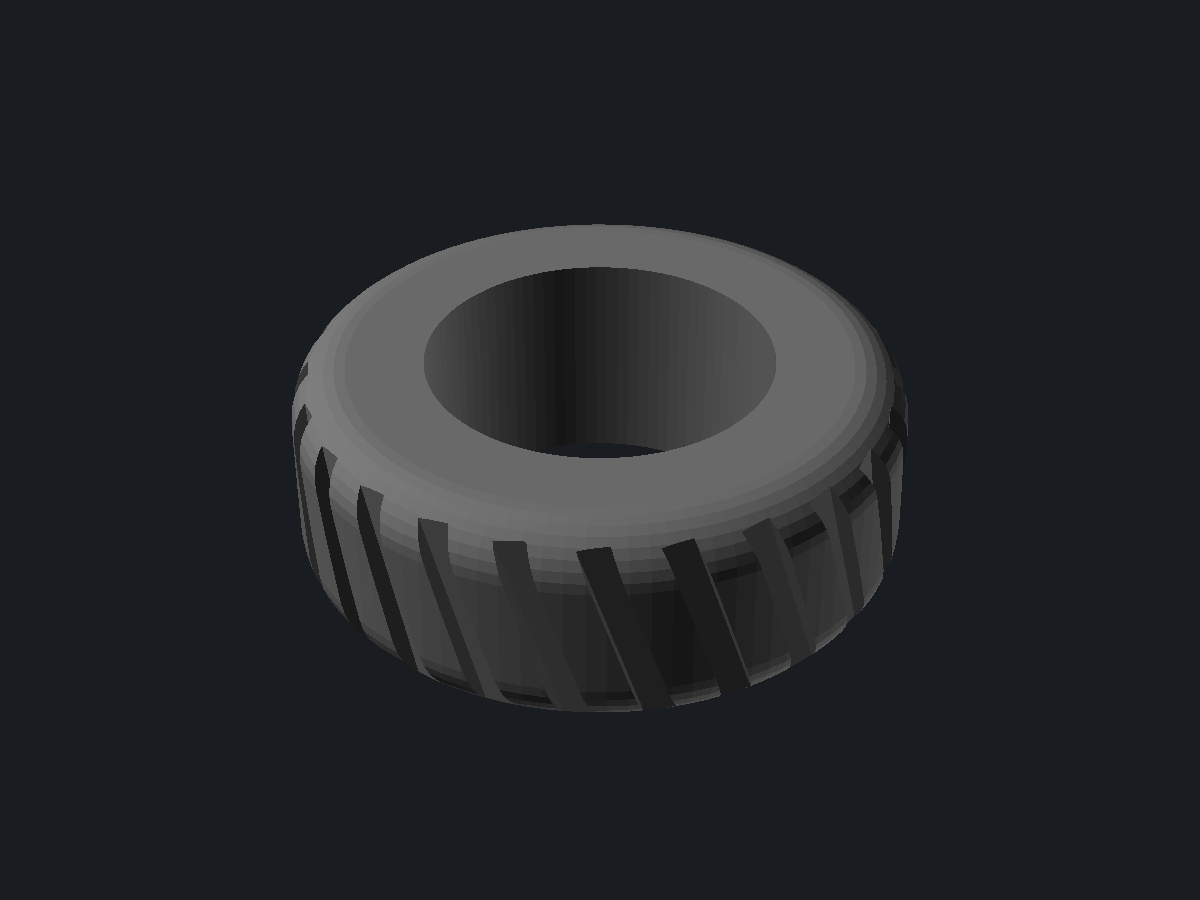
A parametric tyre. A rounded carcass is swept around the axis and a tread is cut into the crown, so the whole shape follows from three sizes: the diameter over the tread, the rim seat it sits on and the width bead to bead.
The image shows the solid OpenSCAD renders at outer_diameter 60 · rim_diameter 34 · width 22 · tread_blocks 24 · tread_depth 1.8 · tread_angle 18 · tread_gap 0.38 · shoulder 0.55 · smoothness 96 · color_tyre DimGray.
Parametric tyre
mick/parametric-tyre@1.0.1
Report
For a legal or policy problem: a license violation, personal data, somebody else’s work republished as their own. A model that prints badly is a comment, not a report.
Parameters
from sourceDescription
What is this
A parametric tyre. A rounded carcass is swept around the axis and a tread is cut into the crown, so the whole shape follows from three sizes: the diameter over the tread, the rim seat it sits on and the width bead to bead.
What you use it for
Wheels for RC cars, robot chassis, model vehicles and desk toys. Set the rim diameter to whatever hub you already have and the tyre grips it; set the tread blocks to zero for a slick.
Design notes
The grooves are cut rather than built. Cutting keeps the crown curve intact between the blocks, and it means the block count and the groove width stay in step: the gap is a share of the pitch, so raising the block count narrows the grooves instead of overlapping them.
The shoulder radius is clamped to what the tyre has to give, so a wide flat tyre and a thin tall one both keep a sane profile instead of collapsing when the shoulder is turned up.
Printed upright in a flexible filament it behaves like a tyre; in a rigid one it is a wheel with a pattern on it.
The colour is display only. It rides along in the preview and in the 3D view so a tyre next to a rim reads as a tyre, and it changes nothing about the shape or the STL.
Parameters
outer_diameter, rim_diameter and width set the size. tread_blocks, tread_depth, tread_angle and tread_gap shape the pattern, and tread_blocks at zero leaves a slick. shoulder rounds the edges from square to half round, and smoothness trades facets for render time. color_tyre picks the colour the tyre is shown in.
Use with your agent
{
  "mcpServers": {
    "remixcad": {
      "type": "http",
      "url": "https://remix-cad.vercel.app/api/mcp"
    }
  }
}get_model("mick/parametric-tyre@1.0.1")Returns the manifest, the source, the import closure and the license obligations. Full MCP setup.
Parameter table
Parsed from the Customizer annotations in main.scad| Name | Default | Range | Unit | Description |
|---|---|---|---|---|
| outer_diameter | 60 | 20 to 200 step 1 | ||
| rim_diameter | 34 | 10 to 160 step 1 | ||
| width | 22 | 4 to 80 step 1 | ||
| tread_blocks | 24 | 0 to 80 step 1 | ||
| tread_depth | 1.8 | 0 to 6 step 0.1 | ||
| tread_angle | 18 | 0 to 60 step 1 | ||
| tread_gap | 0.38 | 0.1 to 0.7 step 0.01 | ||
| shoulder | 0.55 | 0 to 1 step 0.05 | ||
| smoothness | 96 | 24 to 192 step 8 | ||
| color_tyre | "DimGray" | DimGray, Black, SlateGray, Silver, Gainsboro, White, FireBrick, SteelBlue, ForestGreen, Goldenrod |
Lineage
1 model depends on this oneOnly what this model came from and what came from it.
License
Whoever downloads this takes these obligations along- mick/parametric-tyre@1.0.1 is MIT
Source
main.scad is the entrypointmain.scad
// A parametric tyre: a rounded carcass swept around the axis, with a tread cut into the
// crown. Everything follows from the three sizes at the top, so a wheel for an RC car and
// one for a desk toy come out of the same source.

/* [Size] */
// Diameter measured over the tread, the outside of the tyre.
outer_diameter = 60; // [20:1:200]
// Diameter of the rim seat, the hole the tyre sits on.
rim_diameter = 34; // [10:1:160]
// Width across the tyre, bead to bead.
width = 22; // [4:1:80]

/* [Tread] */
// Blocks around the tyre. Zero leaves a slick.
tread_blocks = 24; // [0:1:80]
// How deep each groove is cut into the crown.
tread_depth = 1.8; // [0:0.1:6]
// How far the blocks lean across the tread, in degrees.
tread_angle = 18; // [0:1:60]
// Groove width as a share of the space between blocks.
tread_gap = 0.38; // [0.1:0.01:0.7]

/* [Shape] */
// How round the shoulders are. Zero is a square edge, one is a half circle.
shoulder = 0.55; // [0:0.05:1]
// Facets around the tyre. More is smoother and slower.
smoothness = 96; // [24:8:192]

/* [Colour] */
// Colour the tyre is shown in. Display only, the STL carries no colour.
color_tyre = "DimGray"; // [DimGray, Black, SlateGray, Silver, Gainsboro, White, FireBrick, SteelBlue, ForestGreen, Goldenrod]

/* [Hidden] */
outer_radius = outer_diameter / 2;
rim_radius = rim_diameter / 2;
half_width = width / 2;
// The shoulder never eats more than the tyre has to give, in either direction.
shoulder_radius = shoulder * min(half_width, outer_radius - rim_radius) * 0.9;
// One groove and one block share the pitch, so the gap scales with the block count.
pitch = tread_blocks > 0 ? 360 / tread_blocks : 360;
groove_width = 2 * PI * outer_radius * (pitch / 360) * tread_gap;

// The cross section, revolved later: flat where it meets the rim, rounded at the crown.
module section() {
  hull() {
    translate([rim_radius, -half_width]) square([0.01, width]);
    translate([outer_radius - shoulder_radius, -half_width + shoulder_radius])
      circle(r = shoulder_radius, $fn = 32);
    translate([outer_radius - shoulder_radius, half_width - shoulder_radius])
      circle(r = shoulder_radius, $fn = 32);
  }
}

module carcass() {
  rotate_extrude($fn = smoothness) section();
}

// A groove is a block leaned across the crown. Cutting them is cheaper than building the
// blocks themselves, and it keeps the crown curve intact between them.
module grooves() {
  for (index = [0 : max(tread_blocks - 1, 0)]) {
    rotate([0, 0, index * pitch])
      translate([outer_radius, 0, 0])
        rotate([tread_angle, 0, 0])
          cube([tread_depth * 2, groove_width, width * 3], center = true);
  }
}

module tyre() {
  if (tread_blocks > 0 && tread_depth > 0) {
    difference() {
      carcass();
      grooves();
    }
  } else {
    carcass();
  }
}

color(color_tyre) tyre();
Comments
Context, not a score. Comments never move a model up or down the results.No comments yet
Printed it? A note about your material and the clearance you landed on saves the next person a failed print.