Read this model as text
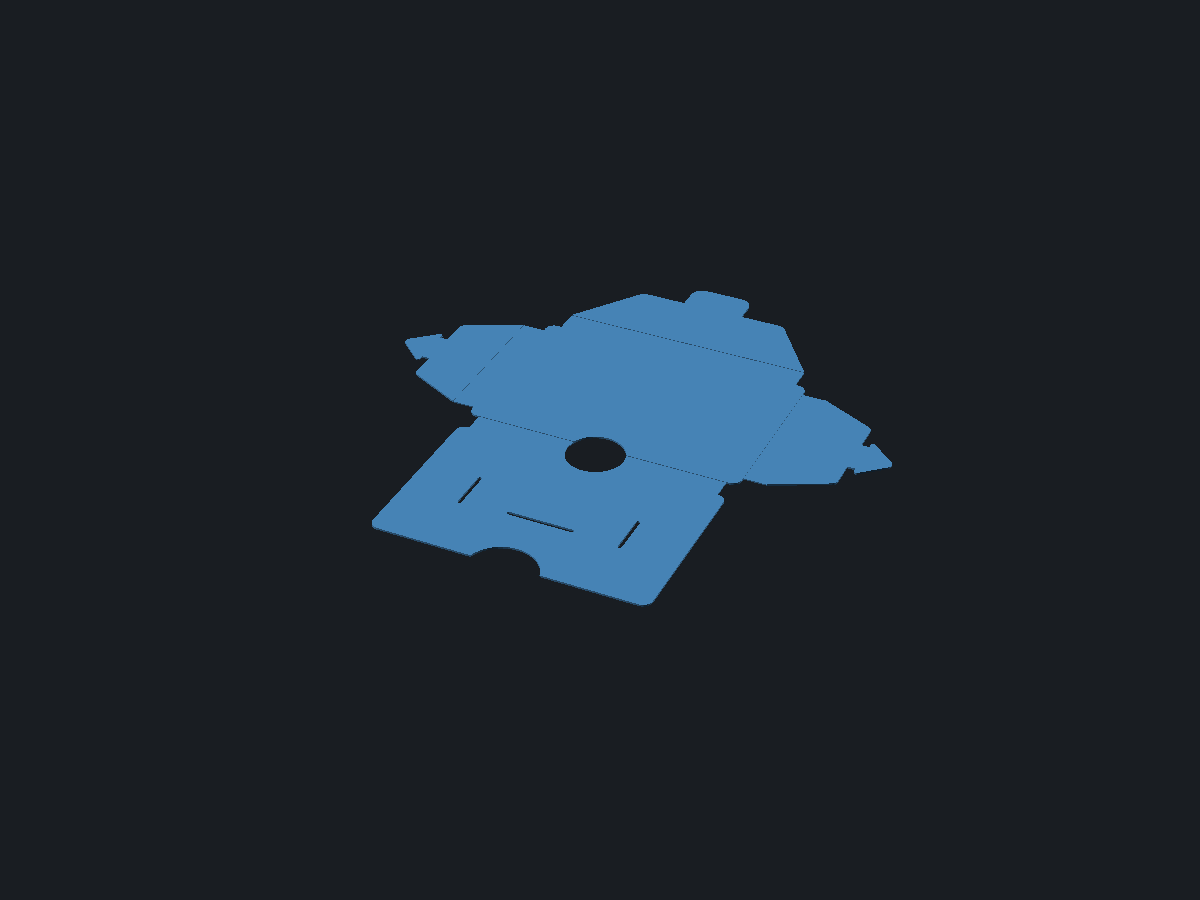
A card sleeve wallet that prints as one flat sheet, a few layers high, and is folded into shape like a paper kit. The panels are stiff, the fold lines are thin bands that bend around the stack of cards. Two side flaps lock into slits with arrow tabs, so it needs no glue. An optional envelope flap closes the top with a tuck-in tongue.
The image shows the solid OpenSCAD renders at cards 5 · cash_room 1 · closing_flap true · panel_thickness 0.6 · fold_thickness 0.4 · card_play 1 · fold 0 · color_wallet SteelBlue.
Origami sleeve wallet, folded from one flat print
mick/origami-sleeve-wallet@0.1.0
Report
For a legal or policy problem: a license violation, personal data, somebody else’s work republished as their own. A model that prints badly is a comment, not a report.
Parameters
from sourceDescription
What is this
A card sleeve wallet that prints as one flat sheet, a few layers high, and is folded into shape like a paper kit. The panels are stiff, the fold lines are thin bands that bend around the stack of cards. Two side flaps lock into slits with arrow tabs, so it needs no glue. An optional envelope flap closes the top with a tuck-in tongue.
What you use it for
A very thin wallet for a handful of cards plus bank notes folded in thirds (they fit the card-sized pocket). Made for PETG on a 180 mm bed. Print it flat with fold = 0, then fold: front panel up over the back, side flaps over the front and push each arrow tab through its slit (one barb first, like a button), then the closing flap over everything with its tongue in the top slit.
Design notes
Everything folds the same way, toward the top of the print, so the bed side becomes the outside of the wallet and the thin fold layers sit on the outer surface. Each fold is a band as wide as the stack it wraps around, not a sharp crease, so it bends in a gentle curve and the wallet stays flat when it is nearly empty. The side flaps wrap around the front panel, the closing flap wraps around both, and each band is one panel thickness wider than the one below it.
The arrow tabs end up between the front panel and the cards. Their heads taper so cards slide over them. The closing tongue has no barbs and points in the direction the cards go in. A hole through the bottom fold lets you push the cards up, and a notch in the front panel gives your thumb grip.
Print tips: PETG, 0.2 mm layers, so panels are three layers and folds are two. Set the bottom and top infill pattern to lines at 45 degrees so the lines cross every fold, never run along it. The preview at fold above 0 uses stiff bands with two 90 degree corners, the real bands curve.
Parameters
cards and cash_room set how thick the pocket is, and with that the width of every fold band. closing_flap adds or removes the envelope flap and its slit. panel_thickness and fold_thickness are the two heights in the sheet, keep them multiples of your layer height. card_play is the room around a card. fold is preview only: 0 is the flat sheet you print, 100 shows it folded. color_wallet is the display colour.
Use with your agent
{
  "mcpServers": {
    "remixcad": {
      "type": "http",
      "url": "https://remix-cad.vercel.app/api/mcp"
    }
  }
}get_model("mick/origami-sleeve-wallet@0.1.0")Returns the manifest, the source, the import closure and the license obligations. Full MCP setup.
Parameter table
Parsed from the Customizer annotations in main.scad| Name | Default | Range | Unit | Description |
|---|---|---|---|---|
| cards | 5 | 2 to 8 step 1 | ||
| cash_room | 1 | 0 to 3 step 0.5 | ||
| closing_flap | true | |||
| panel_thickness | 0.6 | 0.4 to 1.2 step 0.1 | ||
| fold_thickness | 0.4 | 0.12 to 0.6 step 0.02 | ||
| card_play | 1 | 0.5 to 2 step 0.25 | ||
| fold | 0 | 0 to 100 step 5 | ||
| color_wallet | "SteelBlue" | SteelBlue, Silver, Gainsboro, White, DimGray, Black, SlateGray, FireBrick, ForestGreen, Goldenrod |
Lineage
0 models depend on this oneOnly what this model came from and what came from it.
License
Whoever downloads this takes these obligations along- mick/origami-sleeve-wallet@0.1.0 is MIT
Source
main.scad is the entrypointmain.scad
// A card sleeve wallet printed as one flat sheet a few layers high and folded like a
// paper kit. Panels are stiff, fold lines are thin bands that bend around the stack of
// cards. Side flaps lock into slits with arrow tabs, so it needs no glue.
// Everything folds toward the top of the print: the bed side becomes the outside.

/* [Wallet] */
// Number of cards it should hold.
cards = 5; // [2:1:8]
// Extra room for folded bank notes, in mm.
cash_room = 1; // [0:0.5:3]
// Envelope flap that closes the top.
closing_flap = true;

/* [Print] */
// Thickness of the panels. Three layers of 0.2.
panel_thickness = 0.6; // [0.4:0.1:1.2]
// Thickness of the fold lines. Two layers of 0.2.
fold_thickness = 0.4; // [0.12:0.02:0.6]
// Room around a card, per side.
card_play = 1; // [0.5:0.25:2]

/* [Preview] */
// 0 is the flat sheet you print. 100 shows it folded.
fold = 0; // [0:5:100]

/* [Colour] */
// Display only, the STL carries no colour.
color_wallet = "SteelBlue"; // [SteelBlue, Silver, Gainsboro, White, DimGray, Black, SlateGray, FireBrick, ForestGreen, Goldenrod]

/* [Hidden] */
$fn = 48;
card_w = 85.6;
card_h = 54;
card_t = 0.76;

t = panel_thickness;
ft = min(fold_thickness, t);
W = card_w + 2 * card_play;          // back panel
H = card_h + 2 * card_play;
Wf = W - 1.5;                         // front panel, clear of the side folds
Hf = H - 1;
inner = cards * card_t + cash_room + t;   // pocket thickness, the tabs lie inside too
s_front = inner + 2 * t;              // fold band around the cards
s_side = s_front + t;                 // around the cards and the front panel
s_lid = s_side + t;                   // around the side flaps as well

r = 3;            // corner radius of the panels
edge = r + 1;     // folds stop this far from a corner
flap_w = 18;
flap_taper = 8;
lid_h = 22;
lid_taper = 14;
neck_w = 12;
neck_l = 2.5;
head_l = 9;
barb = 2;
tip_w = 4;
tongue_w = 20;
tongue_l = 10;
slit = t + 0.6;
push_r = 9;

A = 90 * fold / 100;   // each fold band turns 90 degrees at both of its edges
D = 20 * fold / 100;   // tabs dive through their slit

echo(str("Flat sheet: ", W + 2 * (s_side + flap_w + neck_l + head_l), " x ",
  H + s_front + Hf + (closing_flap ? s_lid + lid_h + tongue_l : 0), " mm"));

// ---- 2D helpers ----
module rounded(rad) { offset(r = rad) offset(delta = -rad) children(); }

// A slot with round ends, long side along x.
module slot(l, w) {
  hull() for (s = [-1, 1]) translate([s * (l - w) / 2, 0]) circle(d = w);
}

// Hole through the bottom fold to push the cards up.
module push_hole2d() { translate([0, -s_front / 2]) circle(r = push_r); }

// ---- Panels, in print coordinates ----
module back2d() {
  difference() {
    rounded(r) translate([-W / 2, 0]) square([W, H]);
    push_hole2d();
  }
}

module front2d() {
  difference() {
    rounded(r) translate([-Wf / 2, -s_front - Hf]) square([Wf, Hf]);
    push_hole2d();
    // thumb notch in the top edge
    translate([0, -s_front - Hf - 3]) circle(r = 11);
    // slits for the side tabs
    for (s = [-1, 1])
      translate([s * (W / 2 - flap_w - 0.2 - slit / 2), -s_front - H / 2])
        rotate(90) slot(neck_w + 1.5, slit);
    // slit for the closing tongue
    if (closing_flap)
      translate([0, -s_front - (H - lid_h - 0.2 - slit / 2)]) slot(tongue_w + 1, slit);
  }
}

module band_front2d() {
  difference() {
    translate([-Wf / 2 + r, -s_front - 0.05]) square([Wf - 2 * r, s_front + 0.1]);
    push_hole2d();
  }
}

// Right side, the left is its mirror.
module band_side2d() { translate([W / 2 - 0.05, edge]) square([s_side + 0.1, H - 2 * edge]); }

module flap2d() {
  x0 = W / 2 + s_side;
  hull() {
    translate([x0 - 0.01, edge]) square([0.02, H - 2 * edge]);
    for (y = [edge + flap_taper + 2, H - edge - flap_taper - 2])
      translate([x0 + flap_w - 2, y]) circle(r = 2);
  }
}

module tab2d() {
  x1 = W / 2 + s_side + flap_w;
  hw = neck_w + 2 * barb;
  translate([x1 - 0.01, H / 2 - neck_w / 2]) square([neck_l + 1, neck_w]);
  hull() {
    for (s = [-1, 1]) translate([x1 + neck_l + 0.75, H / 2 + s * (hw / 2 - 0.75)]) circle(d = 1.5);
    translate([x1 + neck_l + head_l - tip_w / 2, H / 2]) circle(d = tip_w);
  }
}

module band_lid2d() { translate([-(W / 2 - edge), H - 0.05]) square([W - 2 * edge, s_lid + 0.1]); }

module lid2d() {
  yb = H + s_lid;
  a = W / 2 - edge;
  hull() {
    translate([-a, yb - 0.01]) square([2 * a, 0.02]);
    for (s = [-1, 1]) translate([s * (a - lid_taper - 3), yb + lid_h - 3]) circle(r = 3);
  }
}

module tongue2d() {
  ye = H + s_lid + lid_h;
  hull() {
    translate([-tongue_w / 2, ye - 0.01]) square([tongue_w, 0.02]);
    for (s = [-1, 1]) translate([s * (tongue_w / 2 - 4), ye + tongue_l - 4]) circle(r = 4);
  }
}

// ---- Folding ----
module ext(h) { linear_extrude(height = h) children(); }
// Turn the children around a fold line on the bed: along x at height y, or along y at x.
module hinge_x(y, a) { translate([0, y, 0]) rotate(a = a, v = [1, 0, 0]) translate([0, -y, 0]) children(); }
module hinge_y(x, a) { translate([x, 0, 0]) rotate(a = a, v = [0, 1, 0]) translate([-x, 0, 0]) children(); }

module side() {
  hinge_y(W / 2, -A) {
    ext(ft) band_side2d();
    hinge_y(W / 2 + s_side, -A) {
      ext(t) flap2d();
      hinge_y(W / 2 + s_side + flap_w, -D) ext(t) tab2d();
    }
  }
}

module wallet() {
  ext(t) back2d();
  hinge_x(0, -A) {
    ext(ft) band_front2d();
    hinge_x(-s_front, -A) ext(t) front2d();
  }
  side();
  mirror([1, 0, 0]) side();
  if (closing_flap)
    hinge_x(H, A) {
      ext(ft) band_lid2d();
      hinge_x(H + s_lid, A) {
        ext(t) lid2d();
        hinge_x(H + s_lid + lid_h, D) ext(t) tongue2d();
      }
    }
}

color(color_wallet) wallet();
Comments
Context, not a score. Comments never move a model up or down the results.No comments yet
Printed it? A note about your material and the clearance you landed on saves the next person a failed print.